|
|
Xrdp是Microsoft远程桌面协议(RDP)的一个开源实现,它允许以图形方式控制远程系统。使用RDP,您可以登录到远程计算机并创建一个真正的桌面会话,就像您登录到本地计算机一样。0 X+ A) f: {: B( Z4 [
系统环境/ z; M- ~2 z7 y7 f9 t4 u1 ?+ n
- 服务端:Centos7.7 Minimal
- 客户端:Windows10
% m; t4 v, P6 V9 l8 r6 T2 T
安装桌面环境
! N d" B3 H" H! k- t6 l0 H本实验中安装的系统没有安装桌面环境,我们需要自己安装,如果已经安装桌面了清跳过这一步。Centos7提供了"Cinnamon Desktop","MATE Desktop","GNOME Desktop","KDE Plasma Workspaces","LXQt Desktop","Xfce"让我们安装。
2 t* c2 p: @$ E9 F4 X5 H y下面的命令列出可用环境组:
3 b% Z9 P* L6 o5 g' [- [root@localhost ~]# yum grouplist
. ^9 Q% ^" M9 W3 C8 W - Loaded plugins: fastestmirror
. U) I* e! a, k& h! q& K8 X - There is no installed groups file.1 D Z% k. I0 i- ]2 b) S7 t
- Maybe run: yum groups mark convert (see man yum)
* P4 t- S8 N3 {1 ]' J' l ]* a - Loading mirror speeds from cached hostfile% Y1 i3 r2 d7 I0 Y, N0 f
- * base: mirrors.tuna.tsinghua.edu.cn1 T$ g& J8 h" |% F
- * epel: mirrors.aliyun.com4 t+ u) ?/ h* P7 n
- * extras: mirrors.aliyun.com
2 Z0 ~. e; a, l3 \; x" n/ a - * updates: mirrors.aliyun.com
1 p y2 D) b/ _2 W% j- A1 v - Available Environment Groups:2 I. H5 f6 a4 ^& L+ j9 X9 t
- Minimal Install
" k5 h9 r1 m6 p2 u4 R* W - Compute Node
7 ?- z! ]4 N$ s/ S9 P4 u8 N - Infrastructure Server- H5 d' d! B7 K
- File and Print Server
5 {$ b" F, O7 _$ c - Cinnamon Desktop# m2 o7 S0 @. f3 ~2 Q
- MATE Desktop" A) G' s2 s E7 l8 L, b
- Basic Web Server
* J: G8 P9 a2 S- k - Virtualization Host
3 f6 A& v8 u2 n g; U2 \ - Server with GUI, }* c& d, A6 j- k% W
- GNOME Desktop% S4 s7 c- o5 i1 Z' q$ r4 k
- KDE Plasma Workspaces9 S5 A; Q, H; v4 z
- Development and Creative Workstation' {& l+ t% f7 _; d# P& J" y
- Available Groups:3 B+ m0 K# u: u6 f. K7 f
- Cinnamon+ E- _6 n' P9 O; m9 t
- Compatibility Libraries+ L. ]" i5 G" F" o- w( i" J
- Console Internet Tools R$ I! \) ]9 y: A! C/ y
- Development Tools$ O! X! C4 @- N8 c
- Educational Software
- e5 f1 h3 A- V1 N% K - Electronic Lab
9 ^& r+ x5 E& I' ` - Fedora Packager& R9 R, Z0 H# A! o6 x9 Z: ?
- General Purpose Desktop
6 N* `* x# h0 y# q6 Q9 W3 a - Graphical Administration Tools
+ z+ e& F$ A' l p. j. v t - Haskell$ n6 W9 Y/ _' U+ i( g: A4 R% A7 G
- LXQt Desktop
9 O5 r" H7 k( d& ?0 Y - Legacy UNIX Compatibility
e% d3 e1 d3 p& B- L) {$ T# m9 r$ e - MATE
+ q; X2 Y2 r- C o3 z; X- ? - Milkymist! \/ Q1 W$ ~: n, O# c
- Scientific Support
# R2 G) t% j7 z$ T: p - Security Tools
. O& Y. @* {. Z* K( Q% V; }, C - Smart Card Support& _+ H$ [( w% t
- System Administration Tools
) a2 s& ]3 U0 u. }8 o3 a$ {0 V - System Management1 O+ p# M. ?9 L2 f! g* p) C
- TurboGears application framework
6 p7 R% v g8 `( } - Xfce) d1 u, U# v: @0 I/ V
- Done
/ s, v/ b% B, f7 B7 l$ M5 p: f9 G0 S g% k5 F$ d0 J4 h
我们可以选择自己喜欢的桌面环境,在这里选择安装Xfce桌面:7 }: X# _3 G- A: X, h
- [root@localhost ~]# yum -y install epel-release && yum groupinstall Xfce
6 o( W; B; g; ?& r( d# a安装Xrdp; X" r& V9 H. w3 x/ i. ?! ]# _
- [root@localhost ~]# yum -y install xrdp
d) P- \5 X; {5 t% Y
: j( X0 X7 B9 g0 s8 s6 H: c安装完成之后,设置开机启动并启动xrdp
9 V+ c; K! n- E3 N0 [- ^. ]; ]- [root@localhost ~]# systemctl start xrdp && systemctl enable xrdp
0 k1 A0 J$ V: E7 V1 x
% \+ T5 H U6 i. Y3 s6 m创建~/.Xclients,设置默认启动xfce4桌面
/ D: R. t: m- D4 T- t- [root@localhost ~]# echo "xfce4-session" > ~/.Xclients
+ r4 t$ `- ]" ~) z - [root@localhost ~]# chmod +x .Xclients
* m9 s: [" D3 L$ P& s
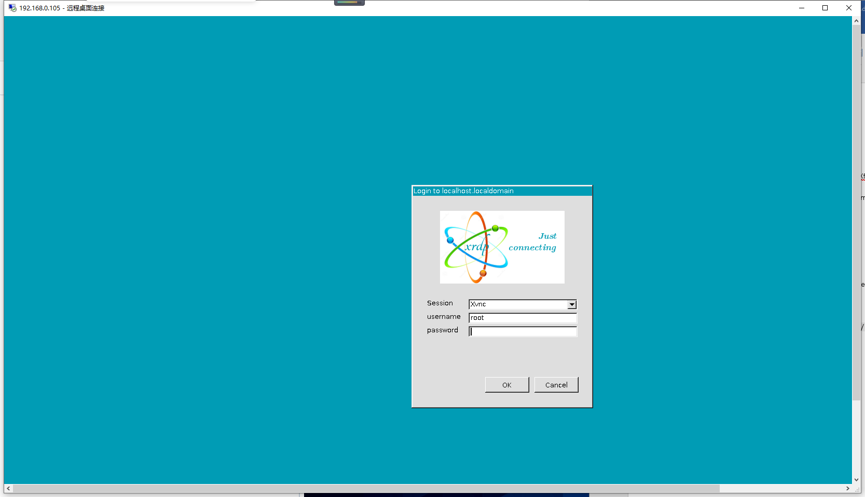
在客户端远程连接
0 M6 N* s; P5 ?4 E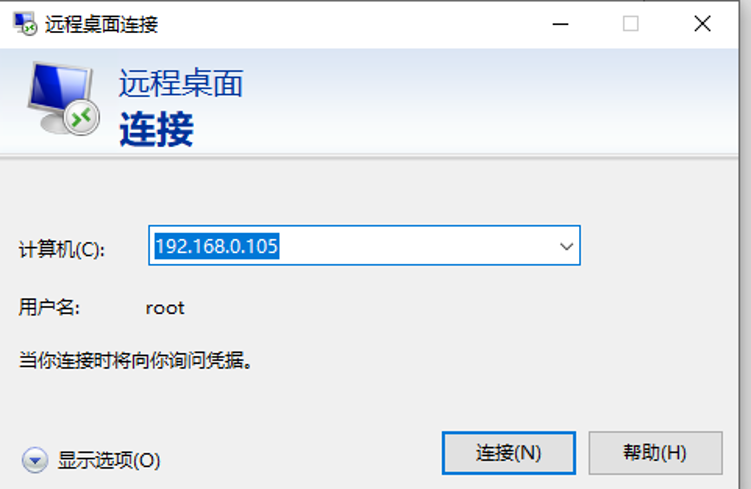 2 G% J3 L! B* |6 ^1 W& ?* g 2 G% J3 L! B* |6 ^1 W& ?* g
: ?) k! M( v9 y& p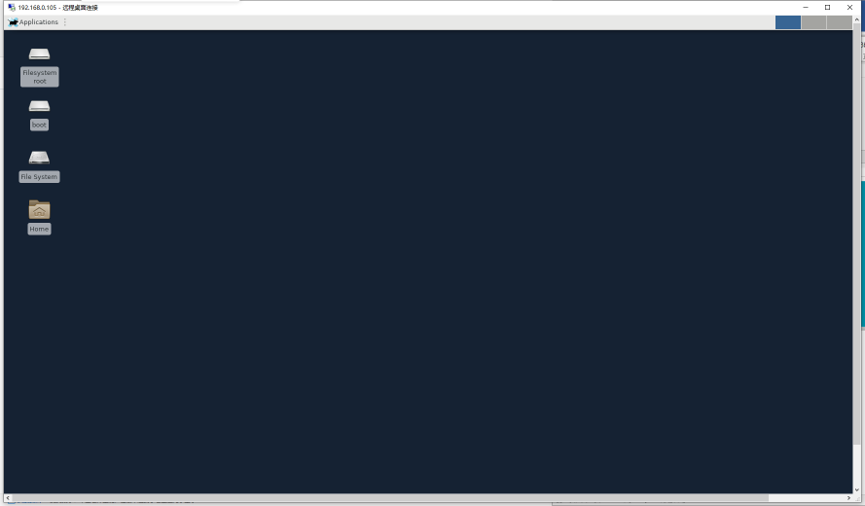
' o- S" h! Z" I% I3 z: \总结
1 o& J3 U) q; @& o7 Q6 v安装Xrdp服务器允许您通过图形界面从本地管理CentOS 7服务器。
# p" I" h0 U) b% ~; s8 q/ n1 |: V o) q4 L7 B* ]
4 `; o% h, [* A; e
|
|


 窥视卡
窥视卡 雷达卡
雷达卡 发表于 2022-6-23 09:05:01
 提升卡
提升卡 置顶卡
置顶卡 沉默卡
沉默卡 喧嚣卡
喧嚣卡 变色卡
变色卡 千斤顶
千斤顶 照妖镜
照妖镜